Description
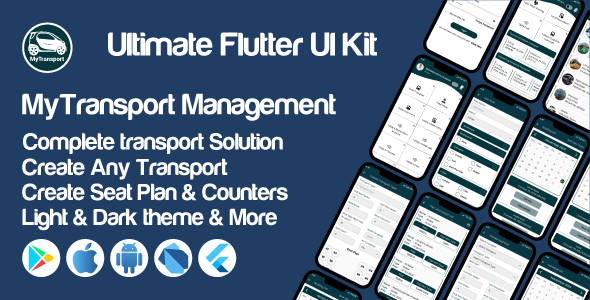
MyTransport UI Kit: A Comprehensive Flutter Solution for Transportation Management
Welcome to MyTransport UI Kit: A Comprehensive Flutter Solution for Transportation Management! This Quick Start Guide is designed to help you get up and running with My Transport quickly and efficiently. Whether you’re a seasoned developer or new to mobile app development, this guide will walk you through the essential steps to integrate Litaudify into your existing codebase.
App Features
- Splash Screen: Displays the app logo and name with a smooth transition to the Login screen.
- Onboarding Screens: Titles with placeholders and descriptions. Includes sign-in and sign-up buttons.
- Login Screen: Input fields for email and password. Social login options with form validation.
- Sign-Up Screen: Input fields for email, Company Name, phone number with country code, and password. Includes options to validate the signup.
- Forget Password Screen: Allows users to recover their password with a valid email address.
- Dashboard Screen: Provides an overview of system operations. Displays key metrics like Total Transport, Total Drivers, Total Customers, Today’s Reservations, Tickets, and Costs. Includes visual navigation for quick access to other sections.
- All Category Screen: Accordion-style menus for navigating different management screens.
- Chat Screen: Real-time chat screen for customer live chat service.
- Profile Info Screen (Under Category Screen): Fields for name, email, mobile number, country, division, district, and address. Fully editable form for updating user information.
- Create Transport Screen: Allows users to create a transport with fields for name, registration number, coach type, total seat, model, and joining date. Includes an upload section for transport-related documents.
- Transport List Screen: Manage transport details. Displays a list of transports with names, registration numbers, and routes. Includes search functionality for filtering transport details.
- Create Seat Plan Screen: Customize and configure seat plans for transports. Includes a dropdown for selecting transport and transport type, input fields for seat rows, columns, and spacing configurations, and a submit button to save the seat plan.
- Seat Plan List Screen: Manage and display seating arrangements for transports. Lists transports with their respective seat configurations and highlights rows, columns, and air-conditioned status.
After purchased you will get
- Full Flutter source code
- Clean and Full Documentations
- Lifetime Free Updates
- Free Customer Support