Description
Nappora | Flutter Daycare Parent App With Laravel Admin
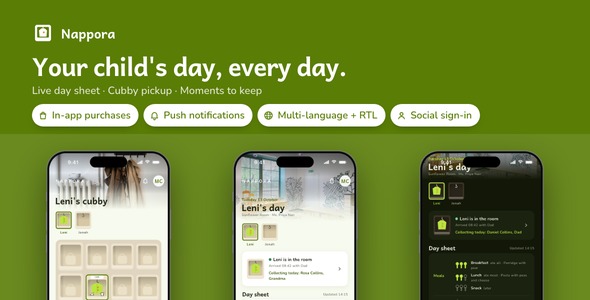
Nappora | Flutter Daycare Parent App With Laravel Admin is the app a daycare or preschool hands its families: the child’s day as the room writes it, with meals, nap, changes and mood; a cubby that answers who is in, who is collecting today and what goes in the bag; the room’s photos and artwork kept in an album; and notices with permission slips answered in one tap, all filled in by the teachers through a Laravel admin panel. The download carries 25 finished screens, and Google and Apple sign-in, store purchases, notifications, Spanish and Arabic beside English, and a product website come wired in. Light and dark themes throughout.
Nine things you will not have to build
- Google and Apple sign-in: a parent taps Continue with Google or Apple and the back end turns the token into a session. Pointed at your server, a provider you have not configured never shows its button; the sample room shows both.
- In-app purchases with a paywall: Nappora Pro opens every earlier day sheet beyond the last seven through App Store and Play products, priced by the store, restored with one tap and remembered offline.
- Push notifications: the center sends a message to every phone now or at a set time, optionally pointing it at a screen of the app; the parent is asked for permission from Settings.
- Analytics and crash reports: screen views and the errors a parent actually hits, collected only after the consent switch is turned on.
- Face ID or fingerprint lock: a parent can ask Nappora to lock itself on launch; a phone with nothing enrolled says so beside the switch.
- Three languages, right to left included: Spanish and Arabic sit beside English, and Arabic turns every screen right to left; adding a language means one file plus one line in app_languages.dart, and the back end answers in the language the phone asked for.
- Update prompts: announce a release from the App updates page of the admin panel and parents see a gentle nudge, or a required update when you say so.
- Share sheet: a day sheet, a notice or a classroom photo goes out through the system share sheet, ready for a grandparent.
- Remote images: room and moment pictures load from your server’s uploads, with a placeholder while they arrive and a fallback when they do not.