Description
BlockGate | App and Website Blocker with Screen Time and Parental PIN
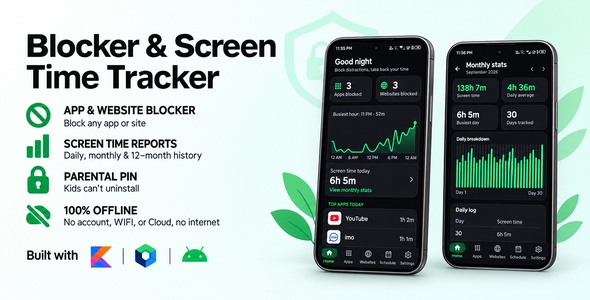
BlockGate | App and Website Blocker with Screen Time and Parental PIN is a complete, production-ready native Android app that blocks distracting apps and websites. Pick the apps and sites that eat your time, and opening them shows a full-screen block page instead. Unblock windows let chosen ones through at set times, a parent PIN keeps children from switching anything off, and a screen time report shows where the hours actually go.
Main Features
App Blocking
- Block any app that has a launcher icon, including pre-installed apps like Chrome and YouTube
- Opening a blocked app shows a full-screen block page instead
- Searchable app picker with app icons
- Blocked-app count shown on Home
Website Blocking
- Block a domain and every subdomain: blocking youtube.com also blocks m.youtube.com and www.youtube.com
- Works in Chrome, Samsung Internet, Firefox, Edge, Brave, Opera, DuckDuckGo and more
- Popular sites are one tap away in the Block a website dialog
- The address bar is read only while at least one website is blocked, and nothing is read while the user is typing in it
- New browsers can be added with one line of code
Parent PIN
- Optional 4-digit PIN for parents, typed into 4 boxes and checked as soon as the last digit is in, with no button to press
- Once set, every unblock, unblock window and uninstall-protection change asks for the PIN instead of the typed code
- A one-time recovery code is shown when the PIN is set (Copy / Share), and Forgot PIN? uses it to set a new PIN, fully offline
- After 5 wrong tries, entry pauses for 30 seconds, then 1, 5 and 15 minutes. The pause is timed from boot, so changing the phone’s clock does not skip it
- The PIN and recovery code are stored only as salted PBKDF2 hashes, never as typed
Unblock Windows
- Weekly or one-day windows that let chosen apps and websites, or everything, through, e.g. a lunch break
- Windows can run past midnight
- A notification says when a window opens
- Edited on a full page with Save always in reach, and Back asks before discarding changes
- Alarms are re-armed automatically after a phone restart or an app update
Uninstall Protection
- Optional device-admin lock so the app cannot be removed on impulse
- Android greys out Force stop for the app while protection is on
- The block page covers the uninstall dialog, App info and the app’s Accessibility settings page
- Uninstalling any other app is never blocked
Screen Time Analytics
- Animated hour-by-hour chart of today on Home: tap or drag to read any hour
- The day’s total and top apps
- Monthly report with an animated bar for every day of the month: touch or drag across the bars to read a day, e.g. “14 Oct · 3h 20m”
- Day-by-day log for the last 12 months
- Android itself keeps per-day usage for only about 10 days, so BlockGate saves each day’s total to its own database, even on days the app is never opened
- The report opens instantly from saved history, then refreshes in the background
Built-in Help
- Permission status with one-tap fixes
- Battery optimization status
- Step-by-step guide for Android 13+ “Restricted setting”
- List of supported browsers
Perfect For
- Students who want to block social media while studying
- Parents who want to limit apps and websites on a child’s phone
- Anyone cutting down on doomscrolling and short-video apps
- Digital wellbeing and productivity app publishers
- Developers who want a finished, tested app blocker to publish under their own brand
- Learning a modern native Android stack: Compose, Hilt, Room and Accessibility services